As the famous transformer paper said, attention is all you need for AI. Yet I think for human, there is a more important one: time, which is all we have.
That said, I have to admit that managing screen time is a really hard job. When I started looking at my own numbers, I was spending 2 to 4 hours a day on YouTube, and 5 to 8 hours a day on my phone. That was the beginning of my journey.
In March I gave a talk about this at work. This post is the written version: what I observed, what I tried, and what changed in the end.
01A guide to increasing your screen time
From what I have learned, I first want to share a guide on how to take your screen time to the next level.
Make friends with the recommendation system. YouTube has a really good one. Open the homepage and there are plenty of interesting videos, based on your history or on people who share your interests. Start watching one, and the videos on the right keep you going. Some go deeper into the topic you are on. Some come out of nowhere, but you are probably interested anyway. So keep in mind: never turn off recommendations.
Scroll infinitely. Instagram, TikTok and Facebook all have useful, relevant information you want to see. They also have a lot of interesting distractions. On Instagram you want your friends’ updates from the last gathering or their latest trip. But there are also funny videos of cats and dogs, and you just can’t stop watching.
For me it is RedNote. If you don’t know it, it is a Chinese app built on user-generated content, a kind of forum. I like it because I can find a lot of local information, for example about Berlin, and plenty of compressed second-hand or even third-hand information. I spent a lot of time on RedNote, I have to admit.
Stick to the default options. Turn on all app notifications when they ask you. Even if they don’t ask, turn them on anyway. Then you always get the interruption when they want to pull you back for a promotion or whatever. Same with email newsletters. You are often subscribed without meaning to be, and that helps too: you open your inbox for something important and get distracted easily.
The basic principle behind all three: follow how the apps want you to use them. Their objective is for you to stay on the platform as long as possible, so just let them optimize.
02The other route: add friction
That was the guide. The rest of this post is the opposite: my experiments in not following how those apps want me to use them.
The first thing I used was a screen time management tool. Its main benefit is that it creates friction. It can make you do a breathing exercise before an app opens. If I want to open Instagram, I pause for five seconds, breathe in, breathe out, and then it asks me explicitly: do you still want to open this?
There are more creative versions too, like solving a math problem first. You can also schedule blocks, so that in the evening Instagram simply doesn’t open. And once you are inside an app, it can stop you again after ten minutes or so. That second interruption helps as much as the first.
The other benefit is measurement. The tool quantifies the time I spend on the screen, so I can see whether it is aligned with how I want to spend it.
The app I recommend is ScreenZen. I have tried a lot of others, free and paid, and this one is free and very customizable.
03What training data do we want to feed our brain?
As human beings, our bandwidth is quite limited. If we view the brain as a model, then the information we process is the data we feed into it, and that data shapes the model. So how our brain turns out depends on how we shape the information we consume. We are what we read, maybe.
For this I use RSS, a protocol that lets you track updates from the web: a blog, a GitHub repository, a news page, whatever. This is the exploitation side. You only look at sources you trust, and they don’t try to distract you.
But if I only exploit, I never find anything new. So on top of RSS I built my own recommendation system, in two ways:
- Curated newsletters. I subscribe to a few that scan the latest sources, pick what is worth reading and give a short summary. I skim them, read the interesting ones, and if a source is worth following, I add it to RSS.
- An LLM. I export all my subscriptions and ask it to recommend similar sources, or ones that could be interesting to me.
Two tools make this work. RSSHub makes many web sources RSS-capable, so if a site has no feed, you can still follow it. And the client I read in is Unread, which is clean and free.
What I follow there is a mix: local community sources to see what is going on, news pages from AI labs to keep up with new models, and some personal interests.
04Customize the defaults
This is the answer to the third tip in my guide. My default now is that no app sends notifications unless there is a really good reason. The messaging app where I talk to friends and family has one. Most others don’t.
I also simplify the interface. I use YouTube without recommendations, which helps a lot. I tried a self-hosted front end first, but it was a bit ugly, so I switched to doing it in the browser. Brave blocks the ads, and it also has an option to hide Shorts and recommendations on YouTube.
And I moved some apps to desktop only. My behavior on desktop is quite different from my behavior on the phone. On desktop I am less tolerant and more impatient when the content is not informative or not interesting. That is how I fight RedNote.
05What actually changed
In the four weeks before the talk, my phone time went from 5 or 6 hours a day down to around 2.
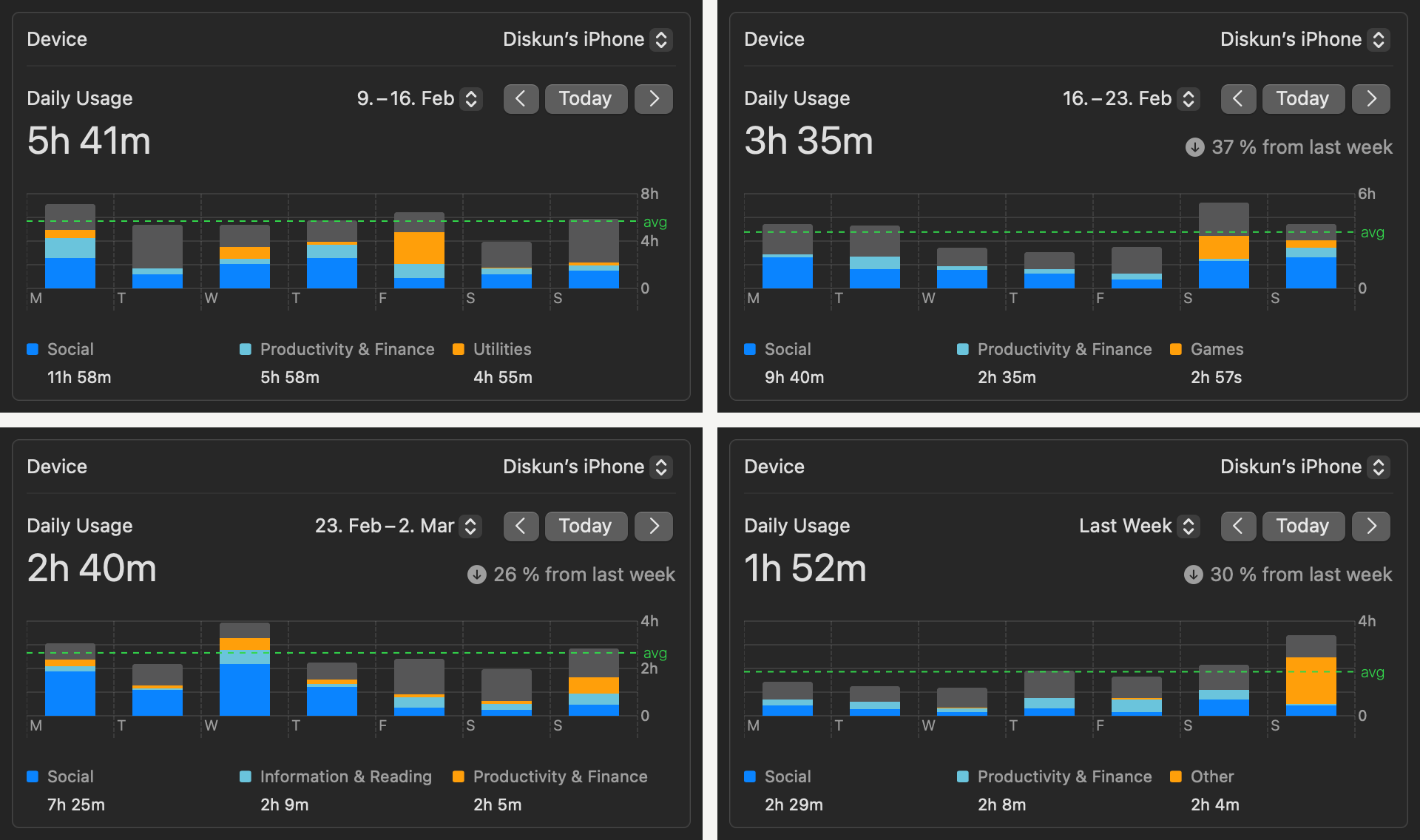
It also shows why this is a hard job. I picked the topic last year, and I started the journey long before that. The big progress only came now, coincidentally right before the presentation.
The tools helped, but two other things mattered more.
Rest. Video used to be my default way to rest. After work I would sit on the couch and watch YouTube for two, three, four hours. Especially when my energy was low, I didn’t know what else to do. I often caught myself bored by a video and still not able to stop.
Then I started to accept boredom as a part of my life. That was super helpful. Now when I am tired, I lie on the couch, with music or without, and that is it. My body is tired, so I let it rest without doing anything.
Curiosity. I realized that a lot of my intrinsic motivation and curiosity had been replaced by screen time. So I asked myself again what I am really interested in, and tried to understand myself better.
A lot of that turned into reading. It sounds like a low-bandwidth thing, but it is so interesting to see that many problems were already thought through hundreds or even thousands of years ago. Radical skepticism, for example. About 400 years ago, in his Meditations on First Philosophy, Descartes decided that at some point a man should re-evaluate every belief in his mind, because until then those beliefs were just put there by society or by whoever was around.
06Take back control
My screen usage was not well aligned with how I want to live my life, and screen time is quite a big portion of the time we have. So it really helps if we can dedicate more of it to what matters to us.